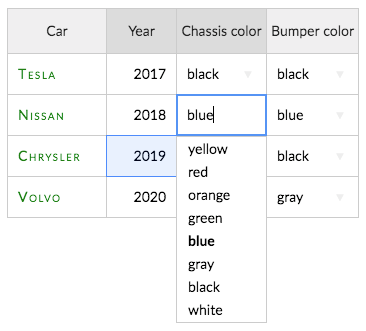
So I’ve managed to create a table with a bit of breathing room, and where nothing breaks, using CSS + JS hooks.
How it works
Styling:
- cell spacing is achieved using basic CSS
- 1 reset is needed to reset padding on autocomplete dropdown (as it is another table)
- 1 workaround (hack) is needed to “fix” textarea (because padding breaks the JS editor rendering)
- additional user classes are defined to style columns and associated active editor
Setup:
classNameattributes should be declared on columns datacellscallback copies column classes to cells (this means you only set up classes on columns)afterBeginEditingcallback copies cell classes to editor (this allows the editor to take on the cell formatting)
The end result is a nicely padded table, with classes that are set once, and that can be edited without it looking broken.
The textarea padding is a hack though - it uses text-indent to indent left, and direction: rtl to indent right.
It would be really cool if the padding issue could be solved at source.