How can I add custom UI to a context menu item? Similar to the ‘filter_by_condition’ and ‘filter_action_bar’
here is an example of a custom context menu option http://jsfiddle.net/handsoncode/59ybb588/
You can add anything you like to the option container (it accepts HTML), however, you will need to remember that the click into option runs the code. That is why you would need to delegate the click if you want to add an input or a custom button.
@aleksandra_budnik I’m aiming for a UI with similar complexity as the Filter functionality here:
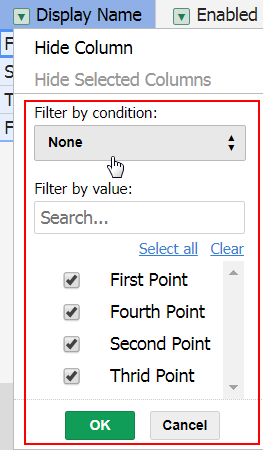
I would be okay with that approach if I just needed a button or two in the option, but it doesn’t seem to be the right way for more complex UI’s. Is this the only way to get custom UI’s into a menu option? How did the Filters plugin achieve their UI?
Thanks for all your help so far.
filter by condition, filter by value and filter action bar are separate structures. The list of filter by condition shares the same UI as the dropdownMenu itself and the list of choices from thefilter by value is a Handsontable instance. The code is solid the and UI is not exposed as something that can be easily copied.