Hello there,
Is there a way to customize the options on a dropdown cell? For eg. I need to append every options on a certain dropdown by some text “Use”. I don’t want this on every dropdowns on the sheet but just on the selected cells through cellConfig. I am using Handsontable with React. Please help.
I’m not sure if I understand your requirements correctly, but you can use the source option to change the dropdown cell type options: Dropdown cell type - JavaScript Data Grid | Handsontable
Hi @adrian.szymanski ,
Thanks for the prompt response. I am already using source array. What I need to do is to stylize the option. In the attached screenshot , the actual option value is PROJ -01-001 but the option needs to look like the screenshot. If it is not possible, can you suggest me a way to render custom divs over the handsontable instance which triggers on clicking a cell but doesn’t actually block the events on handsontable? Thanks

Here’s an example how to achieve this: Handsontable example - JSFiddle - Code Playground You can modify it to your needs. I hope that helps.
Thank you Adrian. It helped immensly.
Hi @adrian.szymanski ,
Although the jsfiddle proved to be very helpful, I’m still not able to fix one thing. The height of options list for only one data is very small and it is causing a scrollbar. Your jsfiddle doesn’t show that issue.
Here’s my implementation:
function renderOptionCell({ td, value }: DropdownOptionRendererParams): void {

td.innerHTML = '';

td.className = '';

Object.assign(td.style, optionCellStyles);


const wrapper = document.createElement('div');

wrapper.style.cssText = getOptionWrapperCssText();


const iconSpan = document.createElement('span');

iconSpan.innerHTML = SUGGESTION_DROPDOWN_ICON_SVG;

iconSpan.style.cssText = iconWrapperCssText;


const useSpan = document.createElement('span');

useSpan.textContent = 'Use ';

useSpan.style.cssText = getUseLabelCssText();


const valueSpan = document.createElement('span');

valueSpan.textContent = value || '';

valueSpan.style.cssText = getValueCssText();


wrapper.append(iconSpan, useSpan, valueSpan);

td.appendChild(wrapper);

}


export const dropdownOptionRenderer = (

_instance: Handsontable.Core,

TD: HTMLTableCellElement,

_row: number,

_column: number,

_prop: string | number,

value: unknown,

_cellProperties: Handsontable.CellProperties,

): void => {

renderOptionCell({

td: TD,

value: value != null ? String(value) : '',

  });

};
//Styles
import { grey, primary } from 'assets/colors';

/** Inline styles for the dropdown list option cell (td). */

export const optionCellStyles: Record<string, string> = {

background: 'transparent',

padding: '4px 6px',

border: 'none',

color: 'black',

margin: '8px 0',

};

/** CssText for the option wrapper div (icon + "Use" + value). */

export function getOptionWrapperCssText(): string {

return [

'display:flex !important',

'gap:6px !important',

'height:100% !important',

'align-items:flex-start !important',

'flex-wrap:wrap !important',

`border:1px solid ${grey.g300} !important`,

'padding:4px !important',

'border-radius:6px !important',

'background:#fff !important',

'cursor:pointer !important',

'white-space:nowrap !important',

].join(';');

}


/** CssText for the icon wrapper span. */

export const iconWrapperCssText =

'display:flex !important;align-items:center !important;flex-shrink:0 !important;';


/** CssText for the "Use" label span. */

export function getUseLabelCssText(): string {

return `color:${grey.g500} !important;font-size:13px !important;`;

}


/** CssText for the value span. */

export function getValueCssText(): string {

return `font-weight:600 !important;color:${primary.main} !important;font-size:13px !important;`;

}
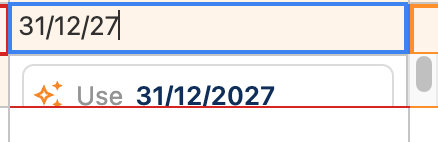
Please modify my example or share yours so I can check what the problem is.
Hi @adrian.szymanski ,
I figured it out and fixed it with custom styling. Thanks
Thank you for the feedback. I’m glad that the problem is solved. Let me know if there’s anything I can help you with.