Array of objects
You can provide the source option as an array of objects with key and value properties. The value property will be used as the dropdown option, while the entire object will be used as the value of the cell.
| Electronics and Gadgets | ▼Los Angeles International Airport |
| Medical Supplies | ▼John F. Kennedy International Airport |
| Auto Parts | ▼Chicago O’Hare International Airport |
| Fresh Produce | ▼London Heathrow Airport |
| Textiles | ▼Charles de Gaulle Airport |
| Industrial Equipment | ▼Dubai International Airport |
| Pharmaceuticals | ▼Tokyo Haneda Airport |
| Consumer Goods | ▼Beijing Capital International Airport |
| Machine Parts | ▼Singapore Changi Airport |
| Food Products | ▼Amsterdam Airport Schiphol |
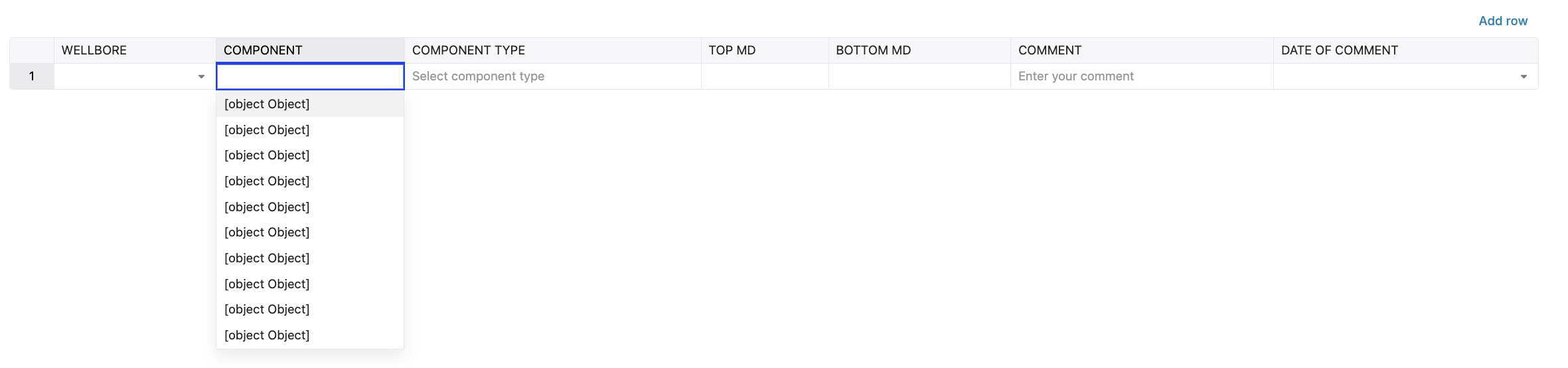
Above is the example given in the documentation but when i am using same example my data is showing in the dropdown as [object object] when passing
const airportKVData = [ { key: ‘LAX’, value: ‘Los Angeles International Airport’ }, { key: ‘JFK’, value: ‘John F. Kennedy International Airport’ }, { key: ‘ORD’, value: “Chicago O’Hare International Airport” }, { key: ‘LHR’, value: ‘London Heathrow Airport’ }, { key: ‘CDG’, value: ‘Charles de Gaulle Airport’ }, { key: ‘DXB’, value: ‘Dubai International Airport’ }, { key: ‘HND’, value: ‘Tokyo Haneda Airport’ }, { key: ‘PEK’, value: ‘Beijing Capital International Airport’ }, { key: ‘SIN’, value: ‘Singapore Changi Airport’ }, { key: ‘AMS’, value: ‘Amsterdam Airport Schiphol’ }, { key: ‘FRA’, value: ‘Frankfurt Airport’ }, { key: ‘ICN’, value: ‘Seoul Incheon International Airport’ }, { key: ‘YYZ’, value: ‘Toronto Pearson International Airport’ }, { key: ‘MAD’, value: ‘Madrid-Barajas Airport’ }, { key: ‘BKK’, value: ‘Bangkok Suvarnabhumi Airport’ }, { key: ‘MUC’, value: ‘Munich International Airport’ }, { key: ‘SYD’, value: ‘Sydney Kingsford Smith Airport’ }, { key: ‘BCN’, value: ‘Barcelona-El Prat Airport’ }, { key: ‘KUL’, value: ‘Kuala Lumpur International Airport’ }, { key: ‘ZRH’, value: ‘Zurich Airport’ }, ];