Hi Handsontable Team,
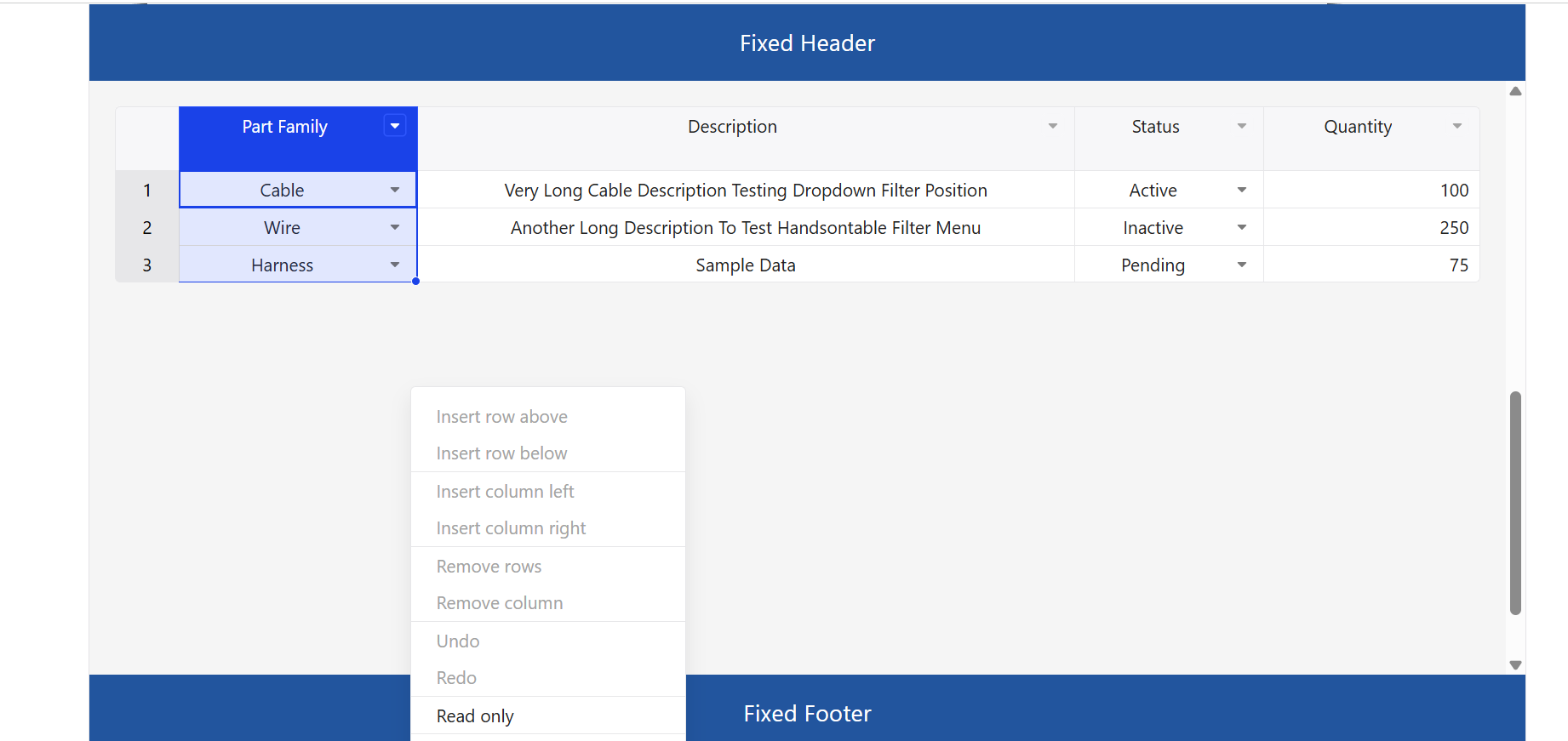
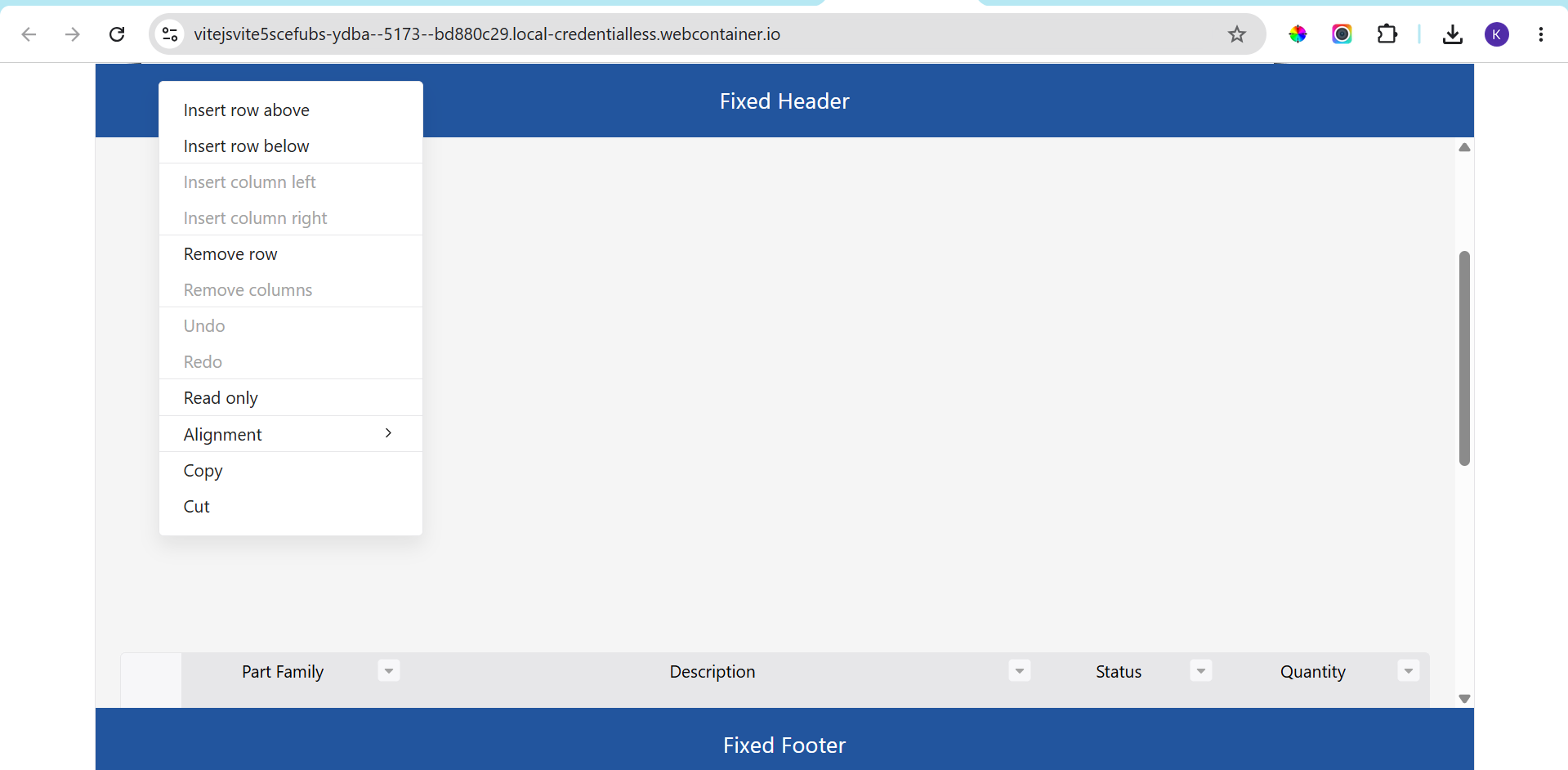
We found two positioning issues with DropdownMenu, Filters, and ContextMenu when Handsontable is placed inside a scrollable container.
Handsontable React
Vite
Latest Handsontable version
Reproduced in a clean StackBlitz project
No PrimeReact, Tailwind, or application-specific code required
StackBlitz:
https://stackblitz.com/edit/vitejs-vite-5scefubs?file=index.html,src%2FApp.tsx
The sample contains:
Open a column filter menu.
Keep the menu open.
Scroll the parent container.
The filter menu should remain attached to the column header and move together with the table.
The filter menu remains at its original screen position while the table scrolls underneath it.
From DevTools we can see that the menu is rendered inside:
<div class="ht-portal">
  <div class="htDropdownMenu">
and the menu position is calculated once using top/left coordinates.
The coordinates are not recalculated when the parent scroll container moves.
Open DropdownMenu or ContextMenu.
Scroll the content area.
The popup should remain visually associated with the table and avoid overlapping application-level fixed header/footer regions.
DropdownMenu and ContextMenu can overlap fixed headers and footers because they are rendered in the global portal layer and are not constrained to the scroll container.
@kranthikumar.reddy32 thank you for the detailed report and StackBlitz example. I’ve created an issue in GitHub:
opened 12:11PM - 05 Jun 26 UTC
bug
### Describe the bug
## Description
When Handsontable is placed inside a scrol… lable container (`overflow: auto`), an open ContextMenu, DropdownMenu, or Filters dropdown does not react when that container is scrolled. The menu stays frozen at the screen coordinates computed at open time while the table scrolls underneath it. Depending on layout, the stranded menu ends up painted over application-level fixed headers/footers, which is how users most often notice it.
Reported on the forum: [DropdownMenu / Filters and ContextMenu positioning issues inside scrollable containers](https://forum.handsontable.com/t/dropdownmenu-filters-and-contextmenu-positioning-issues-inside-scrollable-containers/9075). The report lists two issues, but both share this single root cause — the overlap with fixed header/footer (issue 2) is a consequence of the stale position (issue 1).
**This is not a v16 regression.** In v15 the default menu container was `settings.uiContainer || this.hot.rootDocument.body`, also body-level, with the same once-at-open positioning. v16 only moved the default container from `body` to `div.ht-portal` (also a child of `body`). The behavior is long-standing; it surfaces more now that apps commonly embed Handsontable in scrollable panels between fixed chrome.
Note: the related forum thread [#9070](https://forum.handsontable.com/t/handsontable-v16-dropdown-filter-menu-positioning-issue-in-react/9070) additionally describes blank/misaligned filter UI in v16 — that looks like a separate problem and should not be merged into this issue.
## Steps to reproduce
Layout: fixed header, scrollable content area (`overflow: auto`) containing the table, fixed footer. Config: `dropdownMenu: true`, `filters: true`, `contextMenu: true`.
1. Open a column dropdown/filter menu (or right-click for the context menu).
2. Keep the menu open.
3. Scroll the parent container.
### Expected
The menu remains visually associated with its anchor — it either follows the table or closes. It should not sit detached over unrelated UI (e.g. the app's fixed header/footer).
### Actual
The menu remains at its original screen position while the table scrolls underneath, overlapping the fixed header/footer regions.
## Root cause
- The menu container defaults to `this.hot.rootPortalElement` (`src/plugins/contextMenu/menu/menu.ts`), which is appended to `document.body` (`src/core.ts`).
- Position is computed exactly once per open: `ContextMenu.open()` / `DropdownMenu.open()` call `menu.setPosition()` a single time, and `Cursor` converts the anchor to page coordinates using only `window.scrollY/scrollX` (`src/plugins/contextMenu/menu/cursor.ts`) — intermediate scroll containers are not tracked.
- `Menu.registerEvents()` registers `mousedown`, `touchstart`, and `contextmenu` document listeners (outside-click close), but no `scroll` listener. Nothing in either plugin reacts to ancestor element scroll.
Because the portal is absolutely positioned in document coordinates, **window/page scroll already works correctly** — the menu tracks the page. Only element scrolls (`overflow` containers, including the grid's own `wtHolder`) strand the menu.
## Suggested fix
Close the menu when an outside element is scrolled — the standard overlay-library behavior:
- In `Menu.registerEvents()`, add a capture-phase `scroll` listener on each frame's `rootDocument` (same parent-frame loop as the existing listeners), registered through `this.eventManager`.
- Close when `isOpened()` and the scroll target is an **element** outside `.htMenu` — mirroring the existing `!isChildOf(eventTargetEl(event), '.htMenu')` exclusion used by `onDocumentMouseDown`, so that scrolling inside the menu itself, the filters value list, or a submenu does not close it.
- Ignore events where the target is the document/window — page scroll positions correctly today and must keep working.
An alternative is repositioning the menu on ancestor scroll (the forum reporter's stated expectation). Leaving the choice between close-on-scroll and reposition-on-scroll open for discussion.
## Workaround
Pass `uiContainer` (ContextMenu settings; DropdownMenu's `uiContainer` is also used by Filters) pointing at the scroll container. Menus then scroll with the content and stay under the fixed chrome, at the cost of being clipped by the container's bounds.
### Video/Screenshots
Screenshots in the forum report: https://forum.handsontable.com/uploads/db0066/original/2X/e/ea584f8ce29329d043c8bdfa0c2136edd4009086.png and https://forum.handsontable.com/uploads/db0066/original/2X/f/f48a833ff8f27c902752cace57252dec2be013df.png
### Provide a link to the demo with the bug reproduction
https://stackblitz.com/edit/vitejs-vite-5scefubs?file=index.html,src%2FApp.tsx
### Handsontable version
17.x (latest; behavior present since at least v15)
### Framework version
Reported with React + Vite; framework-agnostic
### Your environment
Any browser and OS (reported on Chrome)
I’ll update this thread once the issue is fixed.
In the meantime, there’s a supported workaround: the uiContainer setting. It tells the ContextMenu and DropdownMenu/Filters to render their elements inside an element you choose instead of the global portal. If you point it at your scrollable content area, the menus become children of that container, so they scroll together with the table and can no longer paint over your fixed header and footer.
A few notes:
Passing dropdownMenu={{ uiContainer: … }} without items keeps the default menu items (including the filter UI), so you don’t need to redefine anything. The Filters dropdown automatically uses the DropdownMenu’s uiContainer.
Make sure the container element exists before Handsontable initializes (in React, render the grid after the ref is set, or pass the element once mounted).
The trade-off: menus are now clipped by the container’s bounds, so a menu opened near the bottom edge may be cut off or extend the container’s scroll area instead of overflowing it. That’s the reason menus render in a global portal by default.
We’ll follow up here once the underlying fix (making menus react to ancestor container scroll) ships.
Hi @kranthikumar.reddy32 , this issue has been fixed with the v18 release. Please let me know if you still have any issues after updating.
opened 12:11PM - 05 Jun 26 UTC
closed 10:25AM - 30 Jun 26 UTC
bug
Status: Answered
Regression
Reported
When Handsontable is placed inside a scrollable container (`overflow: auto`), an… open ContextMenu, DropdownMenu, or Filters dropdown does not react when that container is scrolled. The menu stays frozen at the screen coordinates computed at open time while the table scrolls underneath it. Depending on layout, the stranded menu ends up painted over application-level fixed headers/footers, which is how users most often notice it.
Reported on the forum: [DropdownMenu / Filters and ContextMenu positioning issues inside scrollable containers](https://forum.handsontable.com/t/dropdownmenu-filters-and-contextmenu-positioning-issues-inside-scrollable-containers/9075). The report lists two issues, but both share this single root cause — the overlap with fixed header/footer (issue 2) is a consequence of the stale position (issue 1).
**This is not a v16 regression.** In v15 the default menu container was `settings.uiContainer || this.hot.rootDocument.body`, also body-level, with the same once-at-open positioning. v16 only moved the default container from `body` to `div.ht-portal` (also a child of `body`). The behavior is long-standing; it surfaces more now that apps commonly embed Handsontable in scrollable panels between fixed chrome.
Note: the related forum thread [#9070](https://forum.handsontable.com/t/handsontable-v16-dropdown-filter-menu-positioning-issue-in-react/9070) additionally describes blank/misaligned filter UI in v16 — that looks like a separate problem and should not be merged into this issue.
## Steps to reproduce
Layout: fixed header, scrollable content area (`overflow: auto`) containing the table, fixed footer. Config: `dropdownMenu: true`, `filters: true`, `contextMenu: true`.
1. Open a column dropdown/filter menu (or right-click for the context menu).
2. Keep the menu open.
3. Scroll the parent container.
### Expected
The menu remains visually associated with its anchor — it either follows the table or closes. It should not sit detached over unrelated UI (e.g. the app's fixed header/footer).
### Actual
The menu remains at its original screen position while the table scrolls underneath, overlapping the fixed header/footer regions.
## Root cause
- The menu container defaults to `this.hot.rootPortalElement` (`src/plugins/contextMenu/menu/menu.ts`), which is appended to `document.body` (`src/core.ts`).
- Position is computed exactly once per open: `ContextMenu.open()` / `DropdownMenu.open()` call `menu.setPosition()` a single time, and `Cursor` converts the anchor to page coordinates using only `window.scrollY/scrollX` (`src/plugins/contextMenu/menu/cursor.ts`) — intermediate scroll containers are not tracked.
- `Menu.registerEvents()` registers `mousedown`, `touchstart`, and `contextmenu` document listeners (outside-click close), but no `scroll` listener. Nothing in either plugin reacts to ancestor element scroll.
Because the portal is absolutely positioned in document coordinates, **window/page scroll already works correctly** — the menu tracks the page. Only element scrolls (`overflow` containers, including the grid's own `wtHolder`) strand the menu.
## Suggested fix
Close the menu when an outside element is scrolled — the standard overlay-library behavior:
- In `Menu.registerEvents()`, add a capture-phase `scroll` listener on each frame's `rootDocument` (same parent-frame loop as the existing listeners), registered through `this.eventManager`.
- Close when `isOpened()` and the scroll target is an **element** outside `.htMenu` — mirroring the existing `!isChildOf(eventTargetEl(event), '.htMenu')` exclusion used by `onDocumentMouseDown`, so that scrolling inside the menu itself, the filters value list, or a submenu does not close it.
- Ignore events where the target is the document/window — page scroll positions correctly today and must keep working.
An alternative is repositioning the menu on ancestor scroll (the forum reporter's stated expectation). Leaving the choice between close-on-scroll and reposition-on-scroll open for discussion.
## Workaround
Pass `uiContainer` (ContextMenu settings; DropdownMenu's `uiContainer` is also used by Filters) pointing at the scroll container. Menus then scroll with the content and stay under the fixed chrome, at the cost of being clipped by the container's bounds.
### Video/Screenshots
Screenshots in the forum report: https://forum.handsontable.com/uploads/db0066/original/2X/e/ea584f8ce29329d043c8bdfa0c2136edd4009086.png and https://forum.handsontable.com/uploads/db0066/original/2X/f/f48a833ff8f27c902752cace57252dec2be013df.png
### Provide a link to the demo with the bug reproduction
https://stackblitz.com/edit/vitejs-vite-5scefubs?file=index.html,src%2FApp.tsx
### Handsontable version
17.x (latest; behavior present since at least v15)
### Framework version
Reported with React + Vite; framework-agnostic
### Your environment
Any browser and OS (reported on Chrome)