Hi, I am using Angular 18 with handsontable v16.2.0+. I am trying to make it work using “nested header” and Column headers show up but data do not get displayed in the grid. I want to know data which we provide to the GridSettings. for example from official doc. does the data MUST be array of arrays OR it can be array of objects. In my case i need to figure out the column headers from the API response dynamically. so basically column headers are nestedHeaders and DATA are both dynamic. please give me some inputs or working example. Thanks in advance.
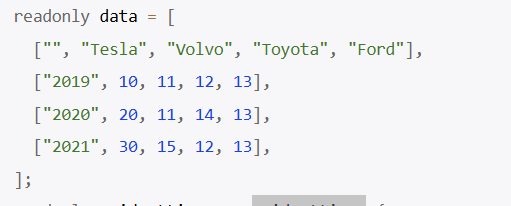
Thank you for contacting us. The nestedHeaders feature need to have a specific structure for the column headers configuration: Handsontable example - JSFiddle - Code Playground
More examples are available here: Column groups - JavaScript Data Grid | Handsontable
my column header configuration fine but my questions for more of the structure of data which we provide to the grid. Is it mandatory that data should “be array of arrays OR it can be array of objects.”? can you give me example of angular with and array of object data. please i have spent quite a bit of time figuring out this and had no luck. i think this latest version of angular wrapper has some issue with nestedheader because nestedheaders works with old deprecated handsontable angular version
It can be either array of arrays, or array of objects. Here’s an example for Angular where you have the data set as the array of objects and nested headers are also present in the configuration: Handsontable example - JSFiddle - Code Playground
Thanks for help Adrian. appreciate it this appears to work, one more “NestedHeaders” question. Is “Column Filtering” is supported while using NestedHeaders. ? ? If Yes please post an example in angular wrapper latest version . I wanted to filter just like excel. Below is the link of column filter feature i am looking for . Column filter - Angular Data Grid | Handsontable
actually I dont get option on the header to filter at all if use dropdownmenu:true
Button icon is not rendering. ht-icon-size is undefined
Thanks
Saif
Here’s an example for the nestedHeaders structure with filters enable: Handsontable example - JSFiddle - Code Playground It will work only for the bottom level of the nested headers.