Hello,
Is there a way to display the header title at 100% width so the text is not truncated, as shown in the image below? When I set columnSorting to false, the header displays correctly. However, when columnSorting is enabled, the header text gets truncated and shows ellipses (...). I would like to keep columnSorting enabled while preventing the header text from being cut off.
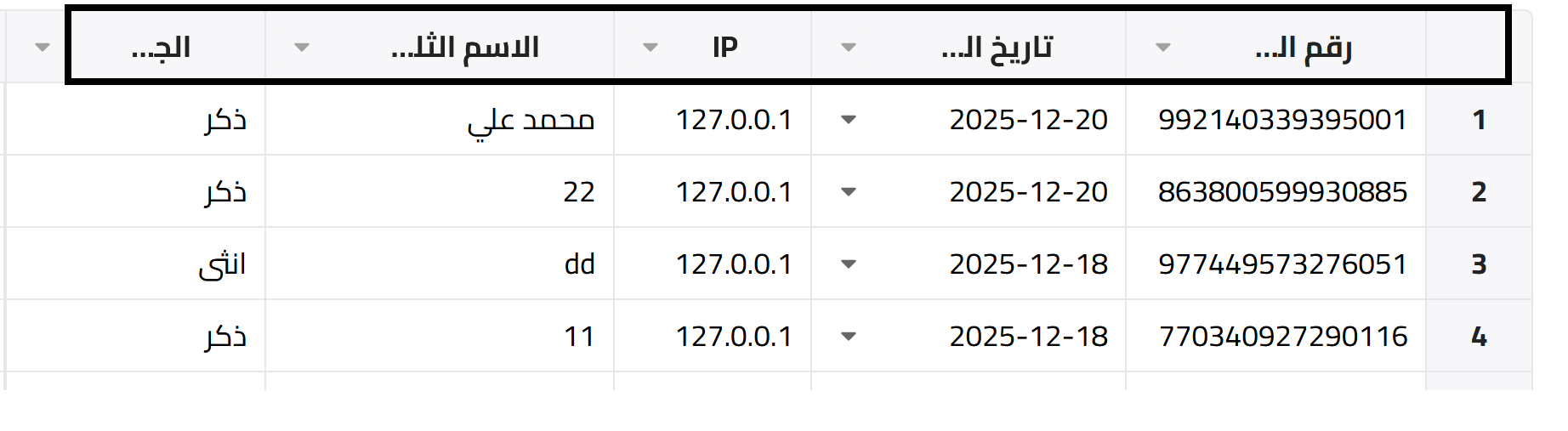
Hi @ykifahh
You can avoid that situation by increasing the columns width: Column widths - React Data Grid | Handsontable Would that solution work for you?
Thank you for your reply. Yes, it works, but in this case all columns have the same width, as if I used colWidths: '200'. When I use autoColumnSize: true, the content is still truncated. Is there an option to automatically adjust the column header width to display all the text while keeping columnSorting: true?
if I set columnSorting: false, everything work perfect but I need to keep the columnSorting: true,
Can you please share a code demo where the problem can be replicated?
Sure, here is the simple code
I want the header title to be display in full while keeping columnSorting: true,
I can’t hard-code colWidths: '150' because the header titles are dynamic, and I want to display the full text
The demo you sent doesn’t represent the screenshot you shared in the first message so I can’t get the same result. Please match the example configuration to your actual issue.
Oh yes, you’re right. I can’t share the same code in a demo because it’s fully connected to the database, so it won’t work there. Instead, I’ll include the entire code in a .txt file so you can review it.
https://storage.dtform.com/localhost_2025-12-23_cda8a79824675ae379b24c3338c592f4.txt
I just don’t want it to be truncated; I want the header title to have its full width by auto.
Hi @ykifahh
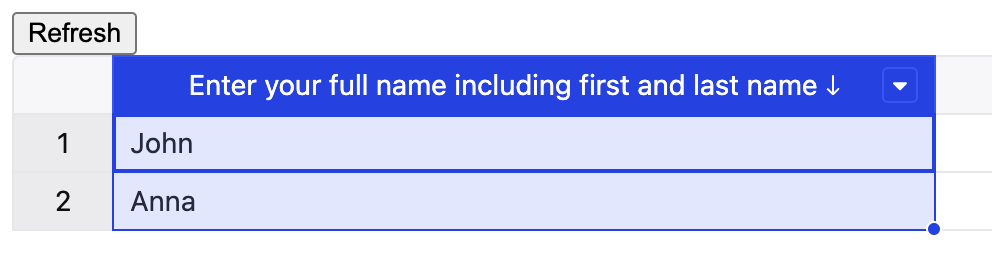
I used your demo to apply the theme (as it was not provided) and disabled fixed 150pixels within colWidths to get this Create a Handsontable spreadsheet with data, filters, and context menu options. - JSFiddle - Code Playground .
We are able to sort the column, and the column name is fully visible. Please let me know if that is the desired outcome, or if there is anything else missing.
Thank you
The issue has been solved
Great.. Thank you for the confirmation.