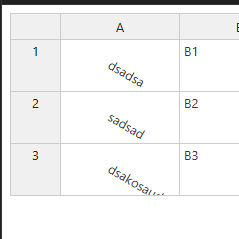
I’m working with a library where I need to rotate the text inside a table row cell. I’ve successfully implemented the text rotation, but I’m facing an issue with long text: it gets trimmed or overflows the cell.
What I need is a way for the row height to auto-resize so the rotated text fits properly — without changing or auto-resizing the column width. The column width must stay fixed.
Is there a built-in feature to support this, or any recommended workaround to achieve proper text wrapping + row height adjustment for rotated text?
Any insights or suggestions would be greatly appreciated. Thanks!
Thank you for contacting us. Text rotation is only supported to some extent. As you noticed the cell dimension calculators doesn’t respect the rotation transformation so you have to adjust the cell size manually to adjust to the rotated text angle.
Thank you for the quick update. Is there any plan to implement automatic row-height adjustment when text is rotated, or is this feature something we could expect in the future?
This should be implemented at the core engine so that’s something to improve on our side. We have plans for improving the auto heigh and width calculations but we don’t have any timeline for this yet.