I am evaluating Handsontable for use in my employer’s app. I have searched both this forum and github for a solution. Forgive me if the solution is obvious.
The app is in react. I am rendering a grid whether data is string[][]. I am not able to share a link but I can share relevant code here.
There are about 50 rows. The filterable columns are text. The first column should have about 50 options. I can only see 4 options and the list is not scrollable. The HTML only lists these 4 options.
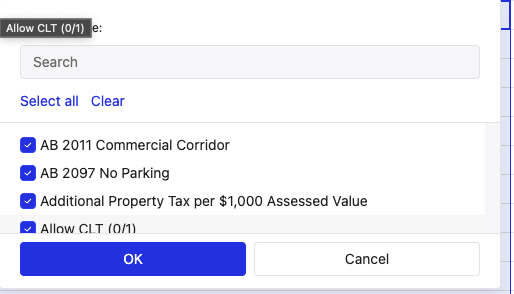
However, I can confirm using the modifyFiltersMultiSelectValue hook that the options do exist internally. I can also search for any option in the list, and the list eventually becomes scrollable with a few options.
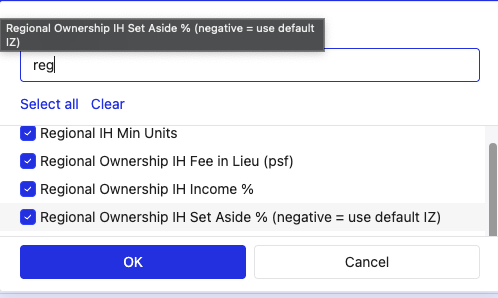
This happens in both columns.
Here is the definition of the table.
export const CompareScenariosTable = observer(() => {
  const ref = useRef<HotTableRef | null>(null)
  const { globalsLayerName: layerName } = useProjectConfig()
  const { colHeaders, tableCells, tableMetaData, isLoading, onChange } =
    useCompareGlobalScenariosData(layerName)
  const { height, width } = useAppLayoutStore()

  useEffect(() => {
    if (!ref.current?.hotInstance || isLoading) return
    ref.current.hotInstance.loadData(clone(tableCells))
  }, [ref, isLoading])

  return (
    <>
      <style>{`
        .ht-theme-main {
          --ht-cell-read-only-background-color: 'white',
        }
      `}</style>
      <TableLayout title="Globals" isLoading={isLoading}>
        <div style={{ height: height - NAVBAR_HEIGHT - 54, width, overflow: 'auto', padding: 10 }}>
          <HotTable
            id="globals-compare-scenarios-table"
            ref={ref}
            themeName="ht-theme-main"
            colHeaders={isLoading ? undefined : colHeaders}
            width="100%"
            height="100%"
            stretchH="all"
            autoColumnSize={{ useHeaders: true }}
            cells={(row, column) => {
              if (isLoading) return {} as CellMeta
              return tableMetaData?.[row]?.[column]?.cellMeta
            }}
            afterChange={changes => {
              changes?.forEach(([row, column, oldValue, newValue]) =>
                onChange({ row, column: column as number, oldValue, newValue }),
              )
            }}
            // plugins
            manualColumnResize
            manualColumnFreeze
            manualColumnMove
            filters
            dropdownMenu={{
              items: {
                filter_by_value: {
                  hidden() {
                    return this.getSelectedRangeLast()!.to.col > 1
                  },
                },
                filter_action_bar: {
                  hidden() {
                    return this.getSelectedRangeLast()!.to.col > 1
                  },
                },
              },
            }}
            // Removes unused column dropdowns
            afterGetColHeader={(col: number, TH: { querySelector: (value: string) => any }) => {
              if (col > 1) {
                const button = TH.querySelector('.changeType')
                if (!button) {
                  return
                }
                button.parentElement.removeChild(button)
              }
            }}
            copyPaste={{ copyColumnHeaders: true }}
            contextMenu={['cut', 'copy', '---------', 'undo', 'redo']}
          />
        </div>
      </TableLayout>
    </>
  )
})